


Adobe is bringing its professional creative tools directly into Google Gemini, allowing users to edit photos, create marketing assets and customize designs without leaving the AI chatbot. At the same time, Adobe is significantly expanding its integration with Claude by adding Acrobat tools and new interactive editing capabilities for PDFs and Adobe Express designs.
The new Adobe in Gemini experience is rolling out globally across all Gemini plans. Users can access Adobe tools through Gemini’s connected apps and use natural-language prompts to describe what they want to create or edit. Adobe says its technology can orchestrate the appropriate tools and workflow behind the scenes.
The announcement marks another step in Adobe’s strategy of bringing its professional creative and productivity tools into popular AI platforms. Adobe already offers integrations across platforms including ChatGPT, Claude, Slack and Copilot, and the company is now expanding that ecosystem to Gemini.

What Is Adobe in Gemini?
Adobe in Gemini brings Adobe’s creative tools directly into Google’s Gemini AI assistant, allowing users to edit images, create designs and generate marketing content through natural-language conversations.
The integration brings capabilities from Photoshop, Lightroom, Adobe Express and Firefly into Gemini. Instead of manually opening separate applications and navigating multiple menus, users can describe the desired result and Adobe’s tools can handle the appropriate steps.
For example, a user could upload product photographs and ask Gemini to improve lighting, adjust colors and create a consistent set of images for an online store. Similarly, users can ask Adobe to adapt an existing design for social media or customize a professionally designed Adobe Express template.
Adobe Photoshop and Lightroom Come to Gemini
One of the major parts of the integration is access to Adobe’s image editing capabilities through Gemini.
Users can describe the changes they want instead of manually working through individual editing tools. Adobe says the Gemini integration can help with tasks such as improving lighting and color, cropping images consistently and preparing product photography for websites or marketing campaigns.
This could be particularly useful for small businesses, creators and marketers who regularly need to process multiple images but may not want to move between several applications.
The integration also brings Lightroom capabilities into the Gemini experience, expanding the types of photo refinement users can request conversationally.
Create Marketing Assets With Adobe Express
Adobe Express is another major component of the Gemini integration.
Users can describe their campaign, audience and preferred visual style, after which Adobe can surface relevant Express designs. They can then ask the system to customize text, imagery and colors.
This creates a workflow in which the user can move from an initial marketing idea to a more polished design without leaving the Gemini conversation.
Adobe says users can also take an existing design and create social-ready versions while maintaining branding and messaging. This can reduce repetitive work when the same campaign needs to be adapted for multiple social platforms.
Adobe Firefly Joins the Gemini Workflow
Adobe’s Firefly technology is also part of the new Gemini experience.
Firefly is central to Adobe’s broader generative AI strategy, and Adobe has increasingly been incorporating Firefly capabilities into conversational and agentic workflows.
The Gemini integration gives users another way to access Adobe’s creative technology while working inside an AI assistant. Instead of thinking about which individual Adobe application or tool should be used first, users can describe the desired outcome and let Adobe coordinate the relevant capabilities.
Adobe previously described this approach as an effort to let users focus on their creative direction while its technology handles the underlying workflow.
Adobe Expands Its Claude Integration
Adobe’s announcement is not limited to Gemini.
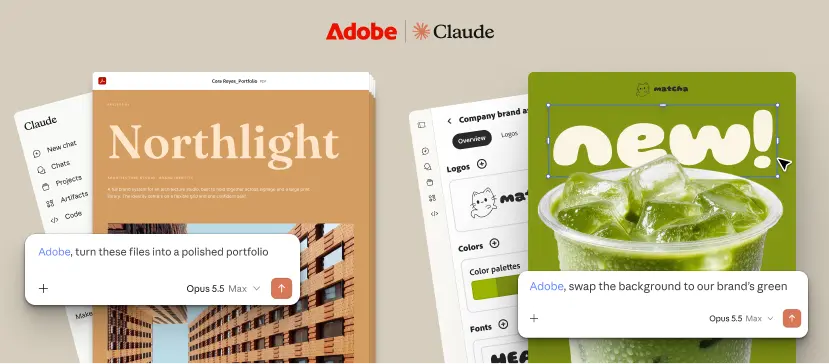
The company is also expanding Adobe for Claude, adding Acrobat tools to the existing collection of creative capabilities. Adobe says the unified plugin now provides access to more than 80 professional tools across Acrobat, Express, Photoshop, Illustrator, Premiere, Lightroom, InDesign, Adobe Stock and other Adobe products.
The expansion means users can work with creative assets and documents within the same Claude conversation instead of switching between separate workflows.
The new Acrobat integration is particularly significant because it brings PDF-related productivity features alongside Adobe’s creative tools.
Acrobat Tools Are Now Available in Claude
With Acrobat added to the Adobe plugin for Claude, users can perform several common PDF tasks directly from their conversations.
Adobe says users can:
- Delete, combine and split PDF pages
- Redact sensitive information
- Convert PDFs into other file formats
- Export documents
- Reorder pages
- Edit PDF text
- Add comments and highlights
- Analyze documents with the new Document Review skill
This expands Adobe for Claude beyond image and design workflows into document productivity.
Users can also open PDFs in a new interactive editor when they need more direct control over the document.
Interactive PDF Editing Inside Claude
Adobe is also introducing a more hands-on editing experience for PDFs.
Rather than relying entirely on conversational prompts, users can open a document in an interactive editor and make changes directly. They can reorder pages, edit text and add comments or highlights.
Adobe’s new Document Review skill can also analyze a document and add recommendations and notations directly inside the editor.
This combination of conversational AI and direct editing gives users more control over the final result while still benefiting from Claude’s ability to understand and work with the document.
Express Gets Layer-Based Editing in Claude
Adobe is also adding interactive editing for Express designs inside Claude.
Previously, conversational workflows could generate or modify designs through prompts. The new layer-based editor provides more granular control.
Users can select individual design elements and modify:
- Images
- Text
- Colors
- Fonts
This means a user does not necessarily need to regenerate an entire design simply because one element needs to change.
For designers and marketers, this could make AI-assisted design workflows more practical because the final stage of creative work often requires precise adjustments rather than another complete generation.
Adobe in Gemini Is Rolling Out Globally
Adobe says Adobe in Gemini is rolling out globally and is available across all Gemini plans.
To get started, users can navigate to Gemini’s Personal Intelligence area, select Adobe under connected apps and sign in with an Adobe account. Adobe also says users can create an Adobe account for free if they do not already have one.
Adobe for Claude is also rolling out globally across Claude and Claude Code on desktop, mobile and web.
Users can begin using the Claude integration as guests, while signing in with an Adobe account unlocks additional capabilities, including higher usage limits, more tools and continuity across sessions. Existing users with the previous Adobe connector will have it automatically updated to the new Adobe plugin.
What This Means for Creators
Adobe’s latest move reflects a broader shift in how creative software is being used.
Instead of starting with a specific application such as Photoshop or Illustrator, users can increasingly start with an AI conversation and describe the outcome they want.
For example, a marketer could upload product photos, request consistent edits, create campaign graphics and adapt the results for social media. A business user could review a PDF, edit its content and prepare a final version without leaving the AI platform.
Adobe is not removing its traditional applications from the workflow. Instead, the company is positioning AI assistants as another entry point into its professional tools.
The approach is also consistent with Adobe’s earlier expansion of its creative connector for Claude, which gave users access to more than 50 professional creative tools across Photoshop, Illustrator, Firefly, Express, Premiere, Lightroom, InDesign and Stock.
Adobe’s Bigger AI Strategy
The Gemini and Claude announcements show Adobe moving toward a more connected ecosystem in which its tools can be accessed from multiple AI platforms.
Adobe’s strategy is not simply about putting individual editing features into chatbots. The company is increasingly allowing AI systems to coordinate multiple tools and steps based on the user’s desired outcome.
That could make complex creative workflows more accessible to people who are familiar with describing what they want but less familiar with traditional creative software.
At the same time, professional users can still move their projects into Adobe’s dedicated applications when they need deeper control and precision.
Adobe vs Traditional Creative Workflows
The biggest difference is the starting point.
In a traditional workflow, users might decide whether to open Photoshop, Lightroom, Express or Acrobat and then manually perform a series of tasks.
With Adobe’s AI integrations, the starting point can instead be a natural-language request.
A user can describe the result and allow the connected Adobe tools to determine which capabilities are needed. The user can then make more detailed adjustments where required.
This approach could reduce the number of application switches involved in everyday creative and document workflows.
Final Thoughts
Adobe’s arrival in Google Gemini gives users a new way to access professional creative capabilities directly from an AI conversation. With Photoshop, Lightroom, Express and Firefly available through Gemini, users can work on photos, marketing assets and designs without constantly switching applications.
The Claude expansion is equally significant, particularly with Acrobat joining Adobe’s existing creative tools. Interactive PDF editing and layer-based Express editing also give users more direct control over AI-assisted work.
Adobe says these features are rolling out globally, making the integration available to a broad range of Gemini and Claude users.
As AI assistants become increasingly capable of coordinating specialized software, Adobe’s latest integrations show how traditional creative applications are evolving from standalone destinations into tools that can operate directly inside conversational workflows.
What is Adobe in Gemini?
Adobe in Gemini is an integration that brings Adobe Photoshop, Lightroom, Express and Firefly capabilities directly into Google Gemini, allowing users to edit photos and create or customize designs through natural-language prompts.
Is Adobe in Gemini available to all Gemini users?
Adobe says Adobe in Gemini is rolling out globally and is available across all Gemini plans. Users can access it through Gemini’s connected apps.
What Adobe tools are available in Gemini?
The initial Adobe in Gemini experience includes capabilities from Photoshop, Lightroom, Adobe Express and Firefly.
What new Adobe tools are available in Claude?
Adobe has added Acrobat tools to its Claude integration, alongside existing creative tools. Adobe says the unified plugin provides access to more than 80 professional tools across Acrobat, Express, Photoshop, Illustrator, Premiere, Lightroom, InDesign, Adobe Stock and more.
Can I edit PDFs directly in Claude?
Yes. Adobe’s expanded Claude integration includes an interactive PDF editor that allows users to reorder pages, edit text, add comments and highlights, and use the Document Review skill to analyze documents.
Source: Adobe