


Canva has introduced Canva Craft, its first AI image generation model developed from the ground up by Canva Research. The new model is designed to help users create high-quality visuals with better composition, more accurate text placement and greater creative control. It is now available globally through Canva’s Dream Lab, while developers can access it through the company’s public API.
Unlike traditional AI image generators that focus primarily on producing pictures from text prompts, Canva Craft has been built with practical design work in mind. It can generate images at resolutions of up to 2K, supports more than 30 aspect ratios and allows users to specify custom dimensions for different creative projects.
The launch marks an important step in Canva’s efforts to bring AI image generation closer to everyday design workflows, including social media graphics, advertising creatives, presentations, posters and marketing materials.
Canva Craft AI Image Generator: Key Features
Canva Craft is designed to handle both realistic imagery and structured visual compositions. It supports photorealistic scenes, portraits, illustrations, digital artwork, landscapes and typography-focused designs.
One of its main advantages is the ability to interpret detailed instructions about how individual elements should appear within an image. Users can describe the position of objects, their relative sizes, the overall visual hierarchy and the placement of text.
The model supports prompts written in any language and can generate text in 55 languages. This could make it useful for businesses, creators and marketing teams producing content for audiences across different regions.
Its support for more than 30 aspect ratios, alongside custom dimensions, also gives users greater flexibility when creating content for different platforms. A single creative brief can be adapted to formats such as social media posts, vertical stories, promotional banners and posters.
How Canva Craft Generates Images
One of the biggest differences between Canva Craft and conventional image generation models is its two-stage architecture.

The first stage focuses on planning the composition. Rather than immediately generating pixels, the model interprets the user’s prompt and creates a structured plan describing the elements that should appear in the image. This includes their spatial relationships, relative scale, visual hierarchy and any text that needs to be included.
In the second stage, a dedicated image-rendering model turns that plan into the final visual, producing output at resolutions of up to 2K.
Separating planning from rendering is intended to improve the accuracy and consistency of generated images. For example, a user requesting a promotional poster with a purple sky, long shadows and a single tree can specify how these elements should appear and which details deserve the most attention.
This approach is particularly relevant to graphic design, where the placement of objects, spacing, alignment and typography can matter as much as the quality of the image itself.
However, as with other generative AI systems, the results may still require review and manual adjustments depending on the complexity of the prompt.
Canva Craft Is Trained for Design, Not Just Photography
Canva says Craft was trained using millions of human-created templates from its content library. These include posters, presentations, social media graphics, menus, infographics and other designs containing text and carefully arranged visual elements.
This training approach is intended to help the model understand the principles behind effective design, rather than simply learning how photographs and objects look.
Following pre-training, Canva used supervised fine-tuning and reinforcement learning, incorporating feedback from its professional designers to improve instruction following, typography and overall visual quality.
The company says its internal evaluation process involved professional designers and researchers assessing more than 25,000 pairs of images against leading models. When automated evaluation results differed from human judgments, Canva prioritised the designers’ assessments.
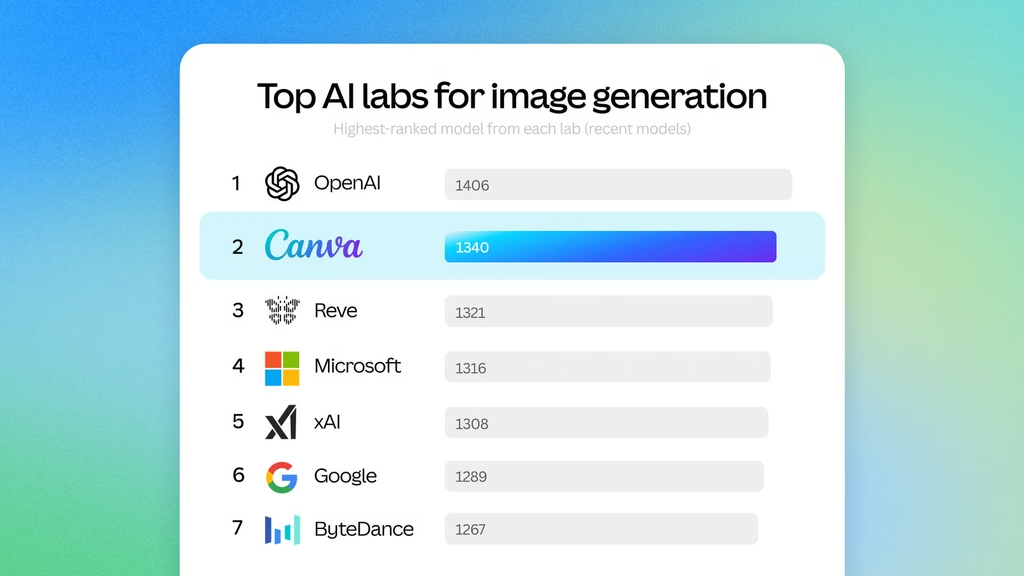
According to Canva, Craft debuted in fourth place overall on DesignArena’s image generation leaderboard. It ranked first for People and Portraits among 87 models, first for Landscapes and Nature among 85 models, second for Abstract and Patterns, and fourth for Products.
These rankings are based on the cited evaluation platform and should not be interpreted as a guarantee that Craft will outperform competing models in every creative task.
Magic Layers Makes AI-Generated Images Editable
Another important part of Canva Craft is its connection with Magic Layers, Canva’s technology for converting generated images into editable design elements.
AI-generated images can be difficult to refine when all their visual components are effectively combined into one flat image. Even a small change may require generating the entire image again or manually recreating parts of the design.
Canva says Craft uses a technique called JSON boundary boxing to help identify and separate individual elements more accurately. This makes it easier to convert generated visuals into editable layers through Magic Layers.
For designers, this could offer a more practical workflow. Instead of accepting an AI-generated image as a finished product, users can refine its individual components and incorporate them into a larger design.
Canva is also working on more advanced editing and reference-image capabilities, although these are planned for future releases.
Faster Image Generation With Lower Computing Costs
Generating AI images at scale requires substantial computing resources, particularly when a platform serves a large number of users.
Canva says more than 250 million people use its platform and collectively create over 400 designs every second. To support this demand, the company has worked on reducing the computing required to generate images.
Through model distillation, Canva reduced the number of inference steps needed by Craft to a fraction of those required by its original model. It also developed a custom inference engine to optimise the planning stage.
According to the company, these improvements made Craft an order of magnitude faster than its first internal version.
Canva is developing two additional versions, called Craft-fast and Craft-ultrafast, which are intended to offer image generation at a fraction of the cost of leading frontier models. Availability dates and detailed pricing have not yet been specified in the announcement.
Canva Craft Availability and Developer Access
Canva Craft is available globally through Dream Lab, which can be accessed from the bottom-left panel in Canva’s interface.
Users can enter a text prompt, describe their desired composition and generate visuals for different creative projects. Access and usage may depend on Canva’s applicable account limits and policies.
Developers and product teams can also use Canva’s public API to integrate the model into external services. Potential applications include marketing platforms, e-commerce websites, advertising tools and print services.
Canva has also announced plans for Canva MCP integration. Once available, this integration is intended to let AI assistants and automated workflows generate images that can be used directly within broader design tasks.
The company has not provided a confirmed release date for this planned integration.
Safety Features and Future Improvements
Canva Craft is supported by Canva Shield, the company’s AI safety framework. It includes input and output moderation, privacy and safety controls, and reporting tools for potentially harmful or misleading content.
Canva says its AI models undergo ongoing testing and safety evaluations that consider factors such as brand safety, cultural context and harmful content.
Looking ahead, the company plans to improve image quality, fine detail and creative control, including support for challenging elements such as fine print and technical drawings.
Final Thoughts
Canva Craft represents a shift towards AI image generation that focuses not only on producing attractive visuals but also on making them useful in real design projects.
Its two-stage generation process, high-resolution output, multilingual text support and integration with Magic Layers could make it a useful option for creators, marketers and professional designers.
The model still needs to prove how consistently it handles complex prompts and detailed typography in everyday use. Nevertheless, its design-focused approach gives Canva a distinct direction in an increasingly competitive AI image generation market.


