



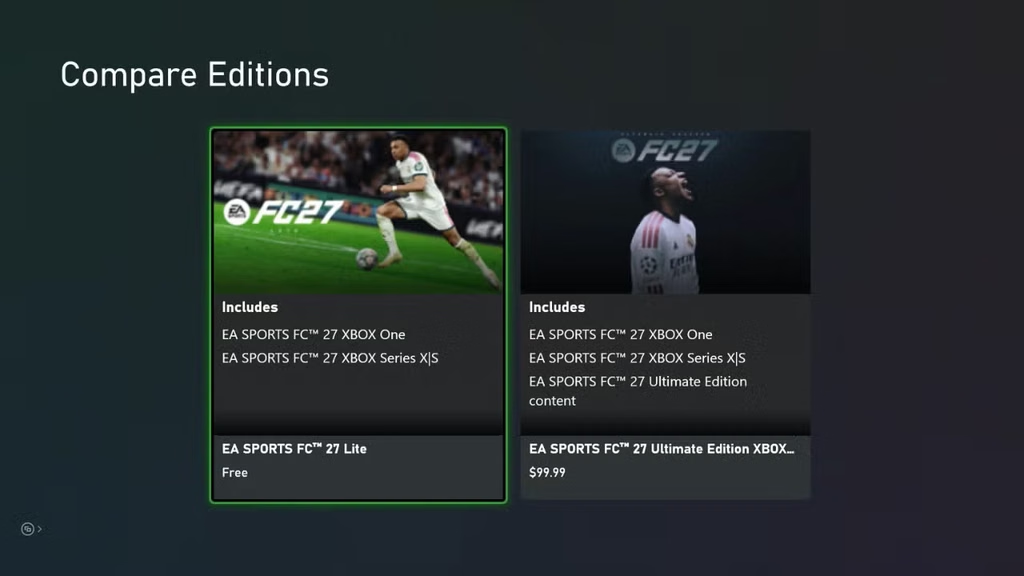
Football fans can now play EA SPORTS FC 27 without buying the full game, thanks to the newly launched EA FC 27 Lite version. Electronic Arts released the free-to-download edition alongside the full game on September 25, giving new and returning players a way to try selected modes before upgrading to the complete experience.
Unlike the 10-hour EA Play trial, FC 27 Lite does not have a playtime limit. Instead, EA restricts the available modes and content. The free version is designed as a preview of FC 27 rather than a replacement for the full game.

How to Download EA FC 27 Lite
Downloading EA FC 27 Lite is straightforward. The free version is available on PlayStation 4, PlayStation 5, Xbox One, Xbox Series X|S, EA app, Steam and Epic Games Store. Nintendo Switch and Nintendo Switch 2 are not currently listed among the supported platforms for FC 27 Lite.
To download the game:
- Open your platform’s digital game store.
- Search for EA SPORTS FC 27 Lite.
- Select the free-to-download version.
- Download and install the game.
- Sign in with your EA Account.
- Start playing the available modes.
The game can be downloaded directly through EA’s official FC 27 information or the relevant digital storefront.
What Modes Are Available in FC 27 Lite?
EA FC 27 Lite includes four main gameplay experiences: Kick-Off, Learn to Play, Online Friendlies and Online Seasons.
Kick-Off allows players to play matches using a limited selection of teams. At launch, EA lists Real Madrid, Bayern Munich, Chelsea women and OL Lyonnes women, although the available selection can rotate over time. Kick-Off also includes Classic Match, House Rules and Rush 3v3.
The Learn to Play section is aimed at players who want to understand the game’s controls and improve their skills.
Online Friendlies lets players challenge friends online, while Online Seasons provides 1v1 online matches and a division-based progression system.
What Is Missing From EA FC 27 Lite?
The free version does not include several of FC 27’s biggest modes.
Football Ultimate Team, The Grounds and Manager Career are not available in FC 27 Lite. Players who want access to those features will need to purchase the full version.
This makes FC 27 Lite particularly useful for players who mainly want to experience basic matches, practice gameplay or play online with friends without immediately paying for the full game.
Does FC 27 Lite Require Internet?
Yes. EA says FC 27 Lite requires a persistent internet connection for all modes, including Kick-Off. An EA Account is also required.
That means players should not expect to use the Lite version as an offline football game.
Can You Upgrade to the Full FC 27 Game?
Yes. Players can upgrade from FC 27 Lite to the full version whenever they want.
EA says progress can carry over when players use the same EA Account on the same platform. The upgrade unlocks the additional game modes and features that are unavailable in the free Lite version.
The full EA SPORTS FC 27 launched globally on September 25 across PlayStation, Xbox, PC and Nintendo platforms, while FC 27 Lite is positioned as a free entry point for players who want to try the game first.
For players who are unsure about buying the latest EA football game, FC 27 Lite provides a way to experience its gameplay without paying upfront.
Frequently Asked Questions
Is EA FC 27 Lite free?
Yes. EA FC 27 Lite is a free-to-download limited version of EA SPORTS FC 27.
Where can I download FC 27 Lite?
FC 27 Lite is available on PS4, PS5, Xbox One, Xbox Series X|S, EA app, Steam and Epic Games Store.
Does FC 27 Lite include Ultimate Team?
No. Ultimate Team, The Grounds and Manager Career are not included in the Lite version.
Does FC 27 Lite work offline?
No. EA requires a persistent internet connection for all FC 27 Lite modes.
Image Source: EA Sports